Thursday, January 12, 2017

Happy New Year!!


Good Morning and Welcome Back!!

It is hard to believe that it has been over two weeks since we have been together!  I bet you missed me :)  In any case, I wanted to start off the morning with a quick recap of your break!  How was it? What did you do?  What was the highlight?  What is one reason you are excited to be back at school?

As a second part to today's post, as you know around the world as the New Year kicks off, people take an opportunity to examine themselves, their lifestyle and goals and are able to focus on how they would like to make a difference starting with yourself in the new year!  Did you make a New Years Resolution?  What are you committed to doing in your life in 2017 and how will it help you be happier, more successful, a better person, etc.  On a secondary level perhaps, what are some goals that you have set for yourself for the second half of the 2016-2017 school year?  Perhaps bad habits you want to break, things you want to do better, goals you want to achieve, etc!  It's a new year, be realistic but dream big :)

Lets kick off the year right with a thorough thoughtful response addressing all parts of the prompt! Thank you and Happy New Year! :)

Monday, January 9, 2017

Adobe Flash Week 1 - Assignment #1


Welcome Back!  Today you will have the opportunity to post your very first animation on your blog.  To do this, be sure to first save your completed animation in your home drive.  Below is a written reminder for how to successfully export and post your animation on your blog.  You can also view the tutorial video here for a visual explanation.
  1. Export your animation by doing the following:
    1. File > Export > Export Movie 
    2. Give your file a name and save as type "QuickTime"
  2. Next, upload your file to your youtube account.
  3. Once the file has been uploaded, grab the embed code (you may have to wait until the file has finished publishing), go to your blog, click the HTML button on the top left and paste that embed code in under the existing code.
  4. Switch back to the "Compose" mode and respond to the following questions:
    1. Name a minimum of 3 different tools that you used.  What does that tool do and how did it help with creating your final animation?
    2. Which tool would you say was the most helpful in creating your animation?  Were multiple tools important?
    3. What did you enjoy about this first Adobe Flash animation?  What was challenging?
    4. Lastly, having been introduced to Adobe Flash and completing this first assignment, what is one thing you would like to learn how to do using this software?
Thank you for your thoughtful feedback!!  I look forward to seeing your creative work.

Monday, November 28, 2016

A Week of College and Career Preparation - It Starts Today!


Good Morning, Happy Monday! I hope you had a relaxing Thanksgiving Holiday. Today, we are back at it, but this week looks a little different. Tomorrow we have a guest presentation in the PAC Theater.  Our presenters include Kyle Wong from Pixlee and Nina Kouyoumdjian from nhastrategy.  Today, I want you to think about a few things:

  1. Do a little research on Kyle Wong and/or Pixlee.  Name 3 things that you learned and what about his story or Pixlee is interesting and/or impressive to you.
  2. Having read about Kyle and Pixlee, what are 3 questions you might have about either his personal business or about starting your own company?
  3. Have you ever been interested in starting your own business?  Regardless, list a few personal characteristic traits you feel are important in making your business a success?
Switching gears, our second speaker will focus on college and the importance of preparing for college as early as possible.  She has a lot of experience in the field and can be of great value in answering questions you might have.  Here are a few things I would like for you to think about in relation to her presentation:
  1. Why is college of personal importance to you?  What is the number one reason you want to go to college?  Name a few schools you would be interested in attending and why those schools stand out as "top choices."  Feel free to spend a moment looking at schools on the College-board Website
  2. What do you know about the college application process?  Outline the process to the best of your ability for me in terms of what is required for a successful applicant!  Start with grades all the way to pushing the submit button.
  3. What is your personal brand?  A personal brand is typically an impression you form in the mind of others.  What would you say your personal brand is with your friends?  Does it differ from the personal brand you have established with your teachers? boss? mentor?
Tomorrow should be an amazing opportunity for you and all Academy students to think about all of the options you have ahead of you.  All I ask you to take advantage of the opportunity!

Thursday, October 6, 2016

Photography Blog Post #7 - Composition


This week we are finally transitioning from a focus on basic skills and camera operation into creating some unique compositions and taking artistic photos.  Remember this week that you can adjust the aperture, ISO, shutter speed and white balance to properly capture whatever images you want (within the assignment's confines of course). 

For this blog please:
  • Post your Photoshop Assignment highlighting the 8 photos that "Use Composition to Show Who You Are."
  • Give a detailed explanation of each of your photos and your overall vision for what you set out to show in each photograph.
  • How well do you think each of your photos tells a story about who you are?  If you had more time, what would you have done the same?  What would you have done differently?  Do you believe the gallery of photos you have taken tell a story themselves?
  • Which of the elements of composition did you personally like the most?  Why?  Can you think of other things you would like to photograph now that you have studied these different elements?
  • What did you enjoy about this assignment? What challenges did you face?  How did you enjoy this assignment in relation to our previous assignments?  Explain why you either enjoyed it more or, alternatively, not as much.
Thank you!

Friday, September 30, 2016

Photography Blog Post #7 - Mastering Photoshop Tools, Layer Blend Modes and Text Effects


September has come and gone and we have taken our second break from our field assignments to focus on some more creative elements you can add to your photography by using Photoshop. This week you will complete two photoshop tutorials. The first one gives you an opportunity to take an image and use Photoshop to flip, rotate and mirror designs and patterns. The second assignments allows you to add a transparent text area to an image . You can complete this weeks blog as 1 posting but please make sure you include a before and after photo highlighting the effects you used in Photoshop. In addition, before completing your blog today, please take a moment to complete this short Google Form in preparation for next weeks 1st mentor meeting: https://goo.gl/4i2ioi

Add a Transparent Text Area to an Image in Photoshop
  • Post your original image(s) and your adjusted image for this assignment.  Please discuss the following in detail:
    • Discuss the process you took to complete this Photoshop tutorial.
    • What do you like about the final image and the text effect? Does this seem like a neat tool to you? Why or why not? Lastly, what did you think of this project? Easy, challenging? Would you be able to use this for any photographs you have for either personal or academic use?
Take an Image and Use Photoshop to Flip, Rotate and Mirror Designs and Patterns
  • Post your original image and adjusted image for this assignment
  • Please discuss the following in detail
    • Discuss the different tools you used to complete this effect.  Be specific.  Be sure to also discuss the layer blend modes you applied at the end of the tutorial and the effects you noticed as you applied them.
    • What did you think of your final product in comparison to your original image?
    • How could the tools learned to complete this project be used again for a project of your choice?  Could you envision using these tools for a school project you have done in the past?  Have coming up this year?  For a personal project?
    • Given the newest skills you learned this week, how are you enjoying our photography and Photoshop unit? What has been your favorite part to date?  What are some skills or tools you would still like to learn more about?  Please take a little time and elaborate on this.

Tuesday, September 20, 2016

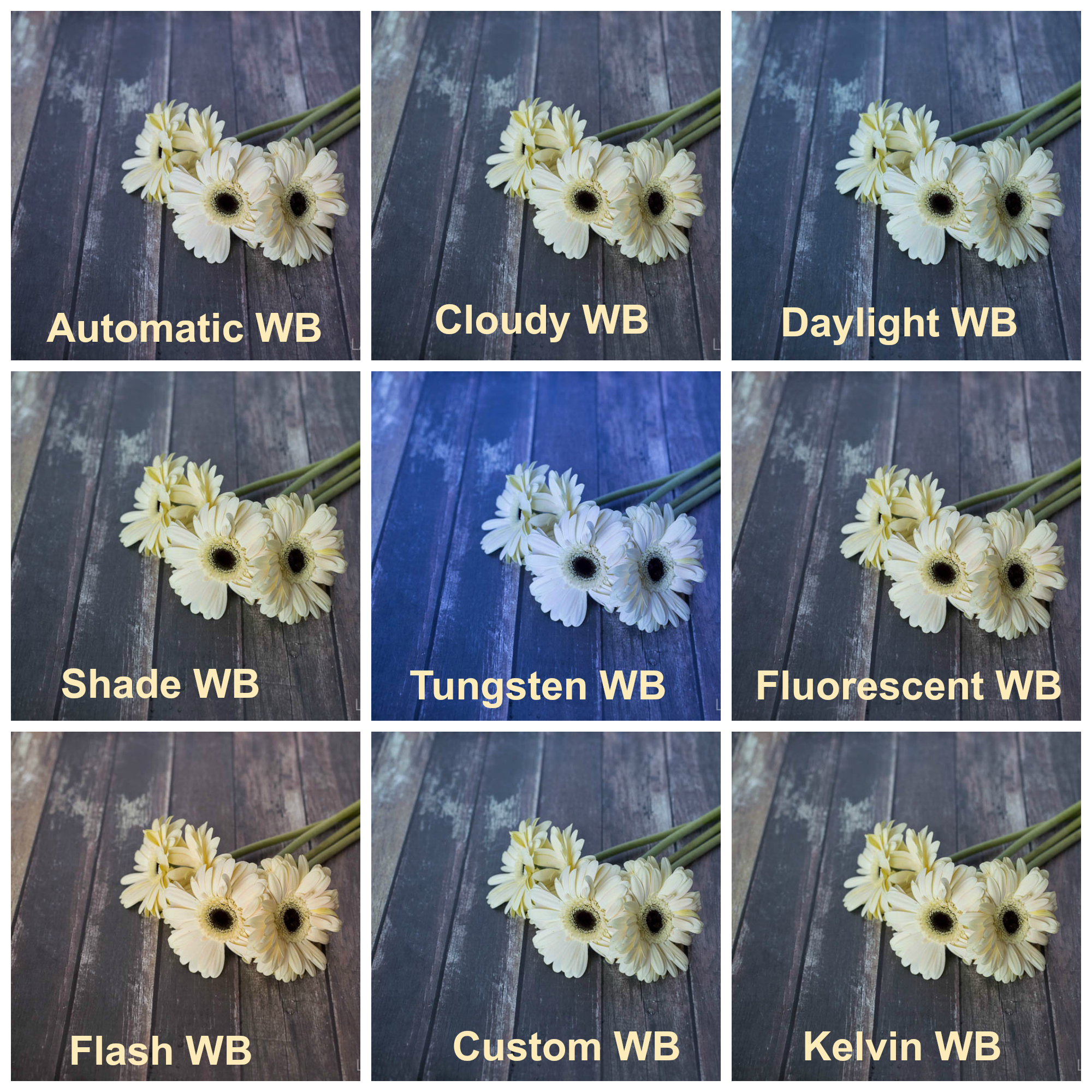
Photography Blog Post #6 - White Balance


You are really learning all the tools of the camera aren't you ... well, not really - there's a long way to go but you are learning about some of the most important adjustments you can make on your camera so that you can truly take unique, one of a kind, photos!! That's honestly, pretty awesome!! This week we learned about white balance and why we need to be good about telling our camera what color the light we are shooting in is. For today's blog:

  • Please post your Photoshop Assignment
  • Discuss White Balance. What did you notice about the different settings you used this week and how did each setting specifically affect the color of the image you took.
  • Do you notice a significant difference between the images you took with different WB settings? Having completed this assignment does it seem important to adjust these settings or not particularly?
  • Discuss whether you think the best photo taken for each subject was the one that aligned best. For example, if you took a picture of a flower on a bright sunny day, did it look best under the "Daylight" setting or did you think it actually ended up looking better using a different setting?
  • Discuss what you enjoyed about this assignment? Were there any challenges you faced? What could you have done, if anything, to make the process go smoother.
Thank you!

Photography Blog Post #5 - Shutter Speed


This week you had the opportunity to learn about and experience what various shutter speeds can do for your photography!  Shutter speed is another amazing tool you can use to create incredible images and gives you the specific power to freeze motion or show motion with your photography!!  For today's blog, please complete the following:

  • Post your completed Photoshop assignment
  • Respond to the following questions:
    • Explain to your readers what shutter speed is/does.  Be sure to explain it clearly and discuss how your images above demonstrate the different shutter speeds you used.
    • Explain how you would show motion and how you would freeze motion.  This is a good opportunity for you to discuss what slower shutter speeds can do for you and what faster shutter speeds can do for you.
    • Discuss a few situations where you would definitely want to use a slower shutter speed and show movement in your photography.  Discuss a few situations where you would definitely want to use a faster shutter speed to freeze movement in your photography.  At minimum, you should discuss 2 examples of each.  Be sure to also discuss how shutter speed can affect your audiences perception about what is going on in the image.
    • Lastly, discuss your experience this week with our assignment.  Did you enjoy the assignment?  Did you face any challenges?  What were they?  What did you enjoy about the assignment.

Thank you!!