Friday, March 10, 2017

Adobe Flash Week 6, Assignment #6 - Car Driving


Our short animations are getting more and more complex!!  Fun right!  This week you had the opportunity to explore more tools that allowed you to create a car that drives.  Of course, within that animation you should have also demonstrated some of the many tools we have been working on throughout the semester including motion tweens, panning and zooming, working within symbols, your drawing skills, etc.  That said, the goal of your blogs is not for me to rehash the skills you are learning but for you to discuss them.  As usual, please respond to the following questions:
  • Describe the assignment you just completed? What was the task and what needed to be done in order for you to successfully complete the assignment?
  • What new skills did you learn from completing this assignment? Be specific and use correct names for the different tools you needed to use to complete the assignment. ie Classic Motion Guide, Keyframes, symbols, panning, etc.  Reread the assignment description or watch the tutorial to remind yourself.  Don't forget to discuss what a shape tween does and any other unique tools you used to create your final product.
  • Was the assignment easy to complete? Did you have any trouble? What did you have trouble with and how did you resolve the issue? What was the most fun aspect of the project and the most challenging?  
  • Besides making the sky change color using the newly learned shape tween, what other types of animations could you make successfully now using similar tools to the ones used in this project?
As we finish this week, it is important to remember we have 2 weeks left in the quarter.  You must stay on top of your work and make sure that all Flash assignments - yes, I am talking about the ones you may have missed along the way, are submitted by March 24th. For your blog - please be sure to write well written thorough responses that you would be proud to share your friends, family and, of course, ME :)

Adobe Flash Week , Assignment #7 - Talking Tomatoes?


Talking Tomatoes? Well hopefully not everyone! I cannot wait to see the wide variety of talking fruits and veggies you produce this week. In addition, by completing this weeks assignment successfully you have not only demonstrated your ability to work with frame by frame animation but have also demonstrated mastery in managing your symbols and library well. You should be excited about your animations getting increasingly complex and proud of the work you are completing.

As a reminder, take pride in these blog posts - they are your public portfolio of work which demonstrates what you are learning, what you are capable of and a great marketable tool for you! Be sure to post your you-tube video (like mine above) and a response to these questions:
  • Describe the assignment you just completed. What was the task and what needed to be done in order for you to successfully complete the assignment?
  • What new skills did you learn from completing this assignment? Be specific.  Discuss the process you had to take in order to have your little veggie or fruit friend talk.
  • What about the assignment was easy and what caused you problems? How were you able to overcome the problems you had?
  • What did you do in your animation to add creativity? Was there anything you wanted to do but didn't have time for?  
  • What else would you want to know how to do to increase the creativity in your animations?  Do you like Adobe Flash?  What are things about this program that you do like and what are things about this program that make you question if you would want to use it again in the future?
Remember to really emphasize the skills you are learning and what you enjoyed about each project in these blogs. It is your opportunity to showcase the high end work you are completing in a public forum.

Friday, March 3, 2017

Adobe Flash Week 5, Assignment #5 - The Butterfly Effect


Hello!!  Congratulations!  Your animations are getting increasingly complex!  You should be proud of the work you are completing and your ability to navigate the Adobe Flash Interface.  It is not an easy program to work with!!  Before we move on to our next assignment, it is important to make sure we have posted a blog for this assignment that includes the posted youtube video (like mine above) and a response to these questions:
  • Describe the assignment you just completed. What was the task and what needed to be done in order for you to successfully complete the assignment?
  • What new skills did you learn from completing this assignment? Be specific.
  • What about the assignment was easy and what caused you problems?  How were you able to overcome the problems you had?
  • What did you do in your animation to add creativity?  Was there anything you wanted to do but didn't have time for?  What was your impression of the pan and zoom tool?  Cool?
  • Besides making the butterfly flap its wings consistently and using the pan and zoom features in your animation, what other types of animations could you make successfully now using similar tools to the ones used in this project? How do you think the pan and zoom effect will help you with our next assignment that will involve a car driving down the road?  What other ideas do you have for animations now that you are getting more familiar with Flash?
Remember to really emphasize the skills you are learning and what you enjoyed about each project in these blogs.  It is your opportunity to showcase the high end work you are completing in a public forum.

Monday, February 13, 2017

Adobe Flash Week 4, Assignment #4 - Visiting the Dutch Countryside!


Wow! It's the week of February 13th!! The weeks are flying by - after this week, we will have 5 days of school left in February!! Soon we will be sending out progress grades and the quarter is going to be over!! This blog is your opportunity to post your completed assignment for the "Working with Symbols and Managing our Library" assignment - also known as the Windmill Assignment. I hope you had fun creating your own little windmill scene. I aways associate windmills with the Dutch countryside - specifically Zaanse Schans and Keukenhof ... perhaps you'll travel there someday.

Similar to previous assignments, the blog questions are:
  • Describe the assignment you just completed? What was the task and what needed to be done in order for you to successfully complete the assignment?
  • What new skills did you learn from completing this assignment? Be specific and use correct names for the different tools you needed to use to complete the assignment. ie Classic Motion Guide, Keyframes, symbols, etc.  Reread the assignment description or watch the tutorial to remind yourself
  • Was the assignment easy to complete? Did you have any trouble? What did you have trouble with and how did you resolve the issue? What was the most fun aspect of the project and the most challenging?
  • Besides making the windmill rotate consistently using these new skills, what other types of animations could you make successfully now using similar tools to the ones used in this project?
As we finish this week, for those of you who have had a great start, keep it up - for those of you who struggled as we got going, now's your time to stay focused and get all of your assignments in - progress grades come out Friday. For your blog - please be sure to write well written thorough responses that you would be proud to share your friends, family and, of course, ME :)

Tuesday, February 7, 2017

Menlo College Reflection


Good Morning and Happy Tuesday!  What an amazing experience yesterday - to be able to get off our High School campus and have the opportunity to visit a college/university in our own community.  This morning, it would be a shame not to take a moment to reflect on this experience.  Below are a series of questions I hope you will take the time to think about and reflect on to personally benefit yourself.  Take your time - this is due at the end of the period:

  • Introduce the activity you were involved in yesterday - what did you physically do?  Include the name of college visited and day/date visited
  • What was your overall impression, or feeling, about this college?
  • Can you imagine yourself attending this college, or one like it? Why or why not?
  • What did you like best about this college?
  • What did you like least?
  • What were some important details you learned from being on the trip yesterday?
  • What would you like to know more about?
  • How will your visit yesterday affect your future plans? Will you apply to this college (or one like it)? Why or why not?
  • How has the college visit affected your decision about going to college and ideas about what you need or want from a post-secondary education?
  • What is your interest level in getting a 4 year college degree on a scale of 1 to 5 (1= not interested; 5 = absolutely will get that degree).  Did yesterday's trip affect your commitment level to this?
  • What do you personally need to do (be specific) to go to a college like the one you visited yesterday?
Although it seems like a different topic, please finish your post today by discussing the class scheduled you plan to sign up for next year.  While you will all be enrolled in Academy Government/Econ and AP Computer Science Principles, what other courses do you also plan to enroll in and how will those help you with ensuring you are meeting your personal academic goals?  What are some steps you can take to ensure you are getting the best grades possible?

Thanks for your thorough and thoughtful response!!  I look forward to reviewing it!

Monday, January 30, 2017

Adobe Flash Week 3, Assignment #3 - Planes will fly!


Hello!  This week we continued building on our skills by learning how to better manage layers in our animations, and make simple scenes that can ultimately be strung together to make more complex animated movies.  For this assignment you were required to use a minimum of 4 layers to create a background image, a plane flying from one side of your screen to the other while doing a flip in the air as it follows a motion guide. Work to have a very detailed background as you use this as an opportunity to develop new skills using a variety of drawing tools. Remember, the more creativity, the better.  Once you have completed the assignment and posted it to Google Classroom, please embed your video on your blog and respond to the following questions:
  1. Describe the assignment you just completed?  What was the task and what needed to be done in order for you to successfully complete the assignment?
  2. What new skills did you learn from completing this assignment?  Be specific and use correct names for the different tools you needed to use to complete the assignment.  ie Classic Motion Guide, Keyframes, etc.
  3. Was the assignment easy to complete?  Did you have any trouble?  What did you have trouble with and how did you resolve the issue?  What was the most fun aspect of the project and the most challenging?
  4. Besides making a plane fly using these new skills, what other types of animations could you make successfully now using similar tools to the ones used in this project?
Once you have finished all of the assignment requirements for this week, please use any additional time you have (if any) to complete work for your classes that is either due soon or is past due, take a look at the opportunity board posted in Google Classroom, etc.

Thank you!

Monday, January 23, 2017

Adobe Flash Week 2 - Assignment #2


Hello!! Thanks so much for working well on your Motion Guide Animations this week. You are learning a lot of new skills and, while there is still a lot to learn, this first part can often be the steepest of the learning curve!! Stay calm, focus and you'll do great!! A reminder that once you are done with your motion guide assignment, please export it to a Quicktime file and upload to youtube so that it can be easily posted in Google Classroom and embedded on your blog. For more specific instructions, please refer to the assignment handout.

Under the video you post to the blog, please quickly respond to the following:

  • Explain the assignment in your own word for the person who may be viewing this assignment.
  • What were you expected to do to successfully complete this assignment?
  • What were 3 different tools (or more if you want to be extra thorough) that you had to work with in Flash to successfully complete this project?
  • What did you enjoy about this project? What was challenging? Why, when sometimes things are difficult, is it an important characteristic to be resilient?
After completing and posting this assignment, please be sure to also read this weeks lecture and complete the quiz!

Thanks and looking forward to seeing some amazing animations and your skills continue to grow!

Thursday, January 12, 2017

Happy New Year!!


Good Morning and Welcome Back!!

It is hard to believe that it has been over two weeks since we have been together!  I bet you missed me :)  In any case, I wanted to start off the morning with a quick recap of your break!  How was it? What did you do?  What was the highlight?  What is one reason you are excited to be back at school?

As a second part to today's post, as you know around the world as the New Year kicks off, people take an opportunity to examine themselves, their lifestyle and goals and are able to focus on how they would like to make a difference starting with yourself in the new year!  Did you make a New Years Resolution?  What are you committed to doing in your life in 2017 and how will it help you be happier, more successful, a better person, etc.  On a secondary level perhaps, what are some goals that you have set for yourself for the second half of the 2016-2017 school year?  Perhaps bad habits you want to break, things you want to do better, goals you want to achieve, etc!  It's a new year, be realistic but dream big :)

Lets kick off the year right with a thorough thoughtful response addressing all parts of the prompt! Thank you and Happy New Year! :)

Monday, January 9, 2017

Adobe Flash Week 1 - Assignment #1


Welcome Back!  Today you will have the opportunity to post your very first animation on your blog.  To do this, be sure to first save your completed animation in your home drive.  Below is a written reminder for how to successfully export and post your animation on your blog.  You can also view the tutorial video here for a visual explanation.
  1. Export your animation by doing the following:
    1. File > Export > Export Movie 
    2. Give your file a name and save as type "QuickTime"
  2. Next, upload your file to your youtube account.
  3. Once the file has been uploaded, grab the embed code (you may have to wait until the file has finished publishing), go to your blog, click the HTML button on the top left and paste that embed code in under the existing code.
  4. Switch back to the "Compose" mode and respond to the following questions:
    1. Name a minimum of 3 different tools that you used.  What does that tool do and how did it help with creating your final animation?
    2. Which tool would you say was the most helpful in creating your animation?  Were multiple tools important?
    3. What did you enjoy about this first Adobe Flash animation?  What was challenging?
    4. Lastly, having been introduced to Adobe Flash and completing this first assignment, what is one thing you would like to learn how to do using this software?
Thank you for your thoughtful feedback!!  I look forward to seeing your creative work.

Monday, November 28, 2016

A Week of College and Career Preparation - It Starts Today!


Good Morning, Happy Monday! I hope you had a relaxing Thanksgiving Holiday. Today, we are back at it, but this week looks a little different. Tomorrow we have a guest presentation in the PAC Theater.  Our presenters include Kyle Wong from Pixlee and Nina Kouyoumdjian from nhastrategy.  Today, I want you to think about a few things:

  1. Do a little research on Kyle Wong and/or Pixlee.  Name 3 things that you learned and what about his story or Pixlee is interesting and/or impressive to you.
  2. Having read about Kyle and Pixlee, what are 3 questions you might have about either his personal business or about starting your own company?
  3. Have you ever been interested in starting your own business?  Regardless, list a few personal characteristic traits you feel are important in making your business a success?
Switching gears, our second speaker will focus on college and the importance of preparing for college as early as possible.  She has a lot of experience in the field and can be of great value in answering questions you might have.  Here are a few things I would like for you to think about in relation to her presentation:
  1. Why is college of personal importance to you?  What is the number one reason you want to go to college?  Name a few schools you would be interested in attending and why those schools stand out as "top choices."  Feel free to spend a moment looking at schools on the College-board Website
  2. What do you know about the college application process?  Outline the process to the best of your ability for me in terms of what is required for a successful applicant!  Start with grades all the way to pushing the submit button.
  3. What is your personal brand?  A personal brand is typically an impression you form in the mind of others.  What would you say your personal brand is with your friends?  Does it differ from the personal brand you have established with your teachers? boss? mentor?
Tomorrow should be an amazing opportunity for you and all Academy students to think about all of the options you have ahead of you.  All I ask you to take advantage of the opportunity!

Thursday, October 6, 2016

Photography Blog Post #7 - Composition


This week we are finally transitioning from a focus on basic skills and camera operation into creating some unique compositions and taking artistic photos.  Remember this week that you can adjust the aperture, ISO, shutter speed and white balance to properly capture whatever images you want (within the assignment's confines of course). 

For this blog please:
  • Post your Photoshop Assignment highlighting the 8 photos that "Use Composition to Show Who You Are."
  • Give a detailed explanation of each of your photos and your overall vision for what you set out to show in each photograph.
  • How well do you think each of your photos tells a story about who you are?  If you had more time, what would you have done the same?  What would you have done differently?  Do you believe the gallery of photos you have taken tell a story themselves?
  • Which of the elements of composition did you personally like the most?  Why?  Can you think of other things you would like to photograph now that you have studied these different elements?
  • What did you enjoy about this assignment? What challenges did you face?  How did you enjoy this assignment in relation to our previous assignments?  Explain why you either enjoyed it more or, alternatively, not as much.
Thank you!

Friday, September 30, 2016

Photography Blog Post #7 - Mastering Photoshop Tools, Layer Blend Modes and Text Effects


September has come and gone and we have taken our second break from our field assignments to focus on some more creative elements you can add to your photography by using Photoshop. This week you will complete two photoshop tutorials. The first one gives you an opportunity to take an image and use Photoshop to flip, rotate and mirror designs and patterns. The second assignments allows you to add a transparent text area to an image . You can complete this weeks blog as 1 posting but please make sure you include a before and after photo highlighting the effects you used in Photoshop. In addition, before completing your blog today, please take a moment to complete this short Google Form in preparation for next weeks 1st mentor meeting: https://goo.gl/4i2ioi

Add a Transparent Text Area to an Image in Photoshop
  • Post your original image(s) and your adjusted image for this assignment.  Please discuss the following in detail:
    • Discuss the process you took to complete this Photoshop tutorial.
    • What do you like about the final image and the text effect? Does this seem like a neat tool to you? Why or why not? Lastly, what did you think of this project? Easy, challenging? Would you be able to use this for any photographs you have for either personal or academic use?
Take an Image and Use Photoshop to Flip, Rotate and Mirror Designs and Patterns
  • Post your original image and adjusted image for this assignment
  • Please discuss the following in detail
    • Discuss the different tools you used to complete this effect.  Be specific.  Be sure to also discuss the layer blend modes you applied at the end of the tutorial and the effects you noticed as you applied them.
    • What did you think of your final product in comparison to your original image?
    • How could the tools learned to complete this project be used again for a project of your choice?  Could you envision using these tools for a school project you have done in the past?  Have coming up this year?  For a personal project?
    • Given the newest skills you learned this week, how are you enjoying our photography and Photoshop unit? What has been your favorite part to date?  What are some skills or tools you would still like to learn more about?  Please take a little time and elaborate on this.

Tuesday, September 20, 2016

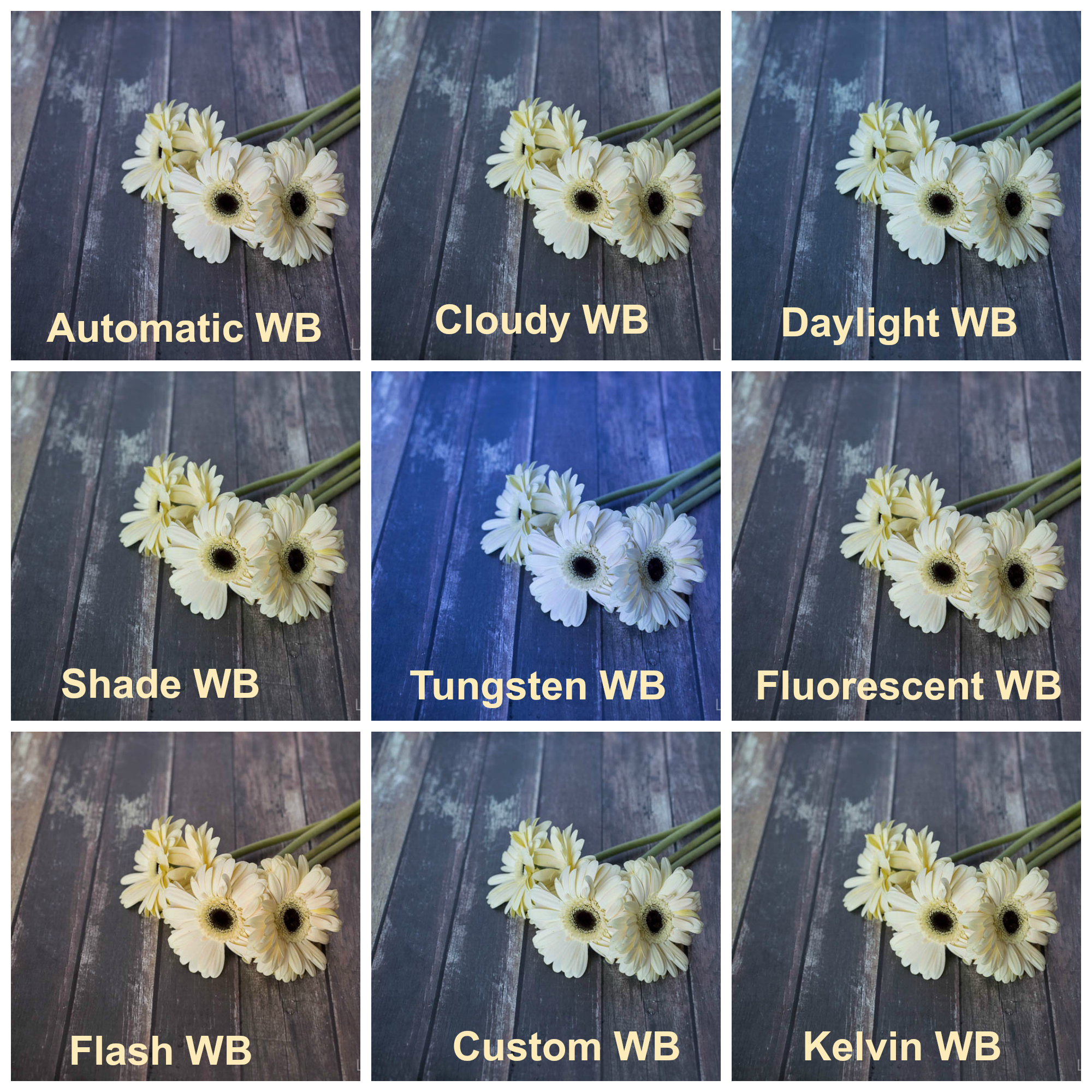
Photography Blog Post #6 - White Balance


You are really learning all the tools of the camera aren't you ... well, not really - there's a long way to go but you are learning about some of the most important adjustments you can make on your camera so that you can truly take unique, one of a kind, photos!! That's honestly, pretty awesome!! This week we learned about white balance and why we need to be good about telling our camera what color the light we are shooting in is. For today's blog:

  • Please post your Photoshop Assignment
  • Discuss White Balance. What did you notice about the different settings you used this week and how did each setting specifically affect the color of the image you took.
  • Do you notice a significant difference between the images you took with different WB settings? Having completed this assignment does it seem important to adjust these settings or not particularly?
  • Discuss whether you think the best photo taken for each subject was the one that aligned best. For example, if you took a picture of a flower on a bright sunny day, did it look best under the "Daylight" setting or did you think it actually ended up looking better using a different setting?
  • Discuss what you enjoyed about this assignment? Were there any challenges you faced? What could you have done, if anything, to make the process go smoother.
Thank you!

Photography Blog Post #5 - Shutter Speed


This week you had the opportunity to learn about and experience what various shutter speeds can do for your photography!  Shutter speed is another amazing tool you can use to create incredible images and gives you the specific power to freeze motion or show motion with your photography!!  For today's blog, please complete the following:

  • Post your completed Photoshop assignment
  • Respond to the following questions:
    • Explain to your readers what shutter speed is/does.  Be sure to explain it clearly and discuss how your images above demonstrate the different shutter speeds you used.
    • Explain how you would show motion and how you would freeze motion.  This is a good opportunity for you to discuss what slower shutter speeds can do for you and what faster shutter speeds can do for you.
    • Discuss a few situations where you would definitely want to use a slower shutter speed and show movement in your photography.  Discuss a few situations where you would definitely want to use a faster shutter speed to freeze movement in your photography.  At minimum, you should discuss 2 examples of each.  Be sure to also discuss how shutter speed can affect your audiences perception about what is going on in the image.
    • Lastly, discuss your experience this week with our assignment.  Did you enjoy the assignment?  Did you face any challenges?  What were they?  What did you enjoy about the assignment.

Thank you!!

Friday, September 9, 2016

Photography Blog Post #3 & #4 - Mastering Photoshop Filters and Layer Blend Modes


Week 3 has come and we are taking a brief break from our field assignments to focus on some of the creative elements you can add to your photography by using Photoshop. This week you will complete two assignments. The first one gives you an opportunity to take an image and use Photoshop to create a watercolor painting effect. The second assignments allows you to take another image along with a texture of your choice and learn how to blend your chosen textures with your photo in Photoshop.  For this weeks blog there are two parts, please complete them as 2 separate postings!

Watercolor Painting Effect
  • Post your original image and adjusted image for the watercolor painting effect assignment
  • Please discuss the following in detail:
    • Discuss the different filters you used to complete this Watercolor Painting Effect.  Be specific and, as much as possible, discuss what each of the filters you used accomplished.
    • What did you think of your final product in comparison to your original image?
    • Discuss an image you would like to take and how adding a water color painting effect would either enhance the original image or detract from it.  Does this seem like a tool you would like to use again with your own work?
    • What is your impression of Photoshop and what have you liked about working with it to date?  You should include 3 things you think are "neat" about working with the program.
How to Blend Textures with Photos in Photoshop
  • Post your original image(s) and your adjusted image for the blending textures with your photo assignment.
  • Please discuss the following in detail:
    • Discuss the layer blend modes and what that does to your original images.
    • Discuss the different blend modes and how they affected the look of your image - be sure to address the Normal, Dissolve, Multiply, Screen, Overlay, Soft Light, and Hard Light blend modes and the effect they had on your image.
    • Which Blend mode did you ultimately choose to use?  What did you particularly like about this blend mode?
    • What does the desaturate command do for your image and did you like the outcome? What about inverting the texture, hue/saturation, Gaussian blur, etc?
    • What do you like about the final image and its effect?  What do you not like?  Does this seem like a neat tool to you? Why or why not?  Lastly, what did you think of this project? Easy, challenging? Would you be able to use this for any photographs you have or would take?

Academy Community Building Trip


Oh my!  What a week!!  I can't believe this is my first day on campus since LAST Friday!  I will say though, even though it was hard to be away, this week demonstrated the power of this program!  Tuesday I visited Hidden Villa Farm with the Sophomores.  We spent the day developing community, building trust and participating in a wide range of activities including a small hike (nothing like the one you guys did) through the farm itself and into the hills.  For our Sophomores, naturally the goal was for them to get to know each other.  You guys, however, already know each other.  Wednesday, in my opinion, was amazing!  We were dropped on Ocean Beach looking over the Pacific Ocean before hiking 5 miles up and down and along the coast through million dollar neighborhoods, on Baker Beach and eventually under the iconic Golden Gate Bridge!  Although challenging at times, the friendly encouragement was nice to see and overall people had positive attitudes from start to finish as we confronted the challenge at hand (even when it seemed like the hike might never end!  Finally, yesterday I witnessed what happens after 2 full years together in the Academy.  Our senior beach day showed the camaraderie that our students have developed as the participated in our 1st annual Academy Olympics, ran along the beach/in the ocean and played some highly competitive teacher vs. student volleyball!  Honestly, looking back on the last three days, they were fantastic!

Today I would like you to take a few minutes and reflect on your activity.  Below are a few questions you can answer, however, feel free to also include any other thoughts/feelings that come to mind.
  • For your reader, please describe (objectively) the activity from Wednesday in a few sentences.
  • What was the goal of the trip?  Be specific and elaborate,  Do you feel the goal was accomplished?  Explain why or why not?
  • Thinking back on the day, how would you rate your participation?  How do you think your level of participation alone can help you succeed at M-A and in life in general?
  • What was your favorite aspect of the hike in San Francisco?  Talk about a favorite moment in detail.
  • What are three things you would say you learned about yourself or your classmates during Wednesday's activities?  
  • Restate your goals for this school year and how you plan to accomplish them - what in the world would our activity have anything to do with you accomplishing your goals for the year?
  • Having had a day to recover, what, if anything, would you have changed about our hike in San Francisco?  What do you think would make a successful "community building" day if it weren't a hike?
Again, above are a series of question you can/should respond to but feel free to add any additional comments about your experience.  Thank you for a thorough and thoughtful response.

Monday, August 29, 2016

Photography Blog Post #2 - "Aperture and Depth of Field"


For today's blog, please respond to the following questions:
  1. Discuss the different subjects you chose to photograph. Why did these subjects appeal to you and why did they seem appropriate for this specific assignment? 
  2. Analyze a series of photographs that show various depths of field. What technique do you like the most? Why? How do you think the aperture affects the feeling of an image? 
  3. Discuss why you chose this set of photos over the other 3 sets you took (why do you like it, how does it fit the requirement)? 
  4. Explain the camera setting/modes you used and why! You must include the f/stop and shutter speed numbers with an accurate explanation of how the aperture values affected each photo for full credit! Remember to discuss the concept of “everything in focus” vs. “one thing in focus” and how your camera settings affected this for each photo. 
  5. What skills did you learn and use completing the Photoshop element of this project? Be specific and thoroughly outline each of the tools you used to create your final product. 
  6. What decisions did you make and/or challenges did you encounter while physically taking the photo. If your answer reads, “I did not make any decisions or encounter any challenges,” you will not receive credit. Be a conscious and intentional photographer, and remember, “You don’t take a good photograph, you make it.” –Ansel Adams
A reminder to post your completed Photoshop assignment on your blog along with 3 of the 6 images shot, one that clearly shows “everything in focus” and one that clearly shows the same subject with “one thing in focus.” Then pick an image between the two that shows the transition. Refer to the image I posted as an example.

Monday, August 22, 2016

Photo Lesson 1 Starts Now! (No Post Required)

Good Morning and Happy Monday!! Today is the day that we will begin taking our own original photos and for this course. With this fun, educational opportunity comes a lot of individual responsibility. Obviously, to have a great final product you will want to take a number of pictures which may require you to make your way around campus - be sure to be respectful of other classes. I am trusting you with valuable equipment and to represent the program well when out of class.

Reminders:
  • Never go into or near a classroom while taking pictures - don't draw the attention or distract any students or teachers in other classes.
  • Be sure to monitor your time. You need to be back in class with a minimum of 10 minutes to upload your photos and put your cameras away neatly.
  • Be sure your memory(SD) card is always removed from the computer placed back in your camera before returning it to the closet
  • Always return your camera to the closet before leaving ... being left on a desk is not a safe place for a $1,000 piece of equipment!! 
  • Always have the lens caps on while you are not shooting images.
  • Use your class time well to complete assignments. Photos, Blog and Photoshop Assignment are due Friday by the end of class.
  • If you use any of my personal materials brought to class for you to photograph, they are expected to be left neat and clean for me on the back counter.
I hope you can understand why the above instructions are important to me. Please work well today (and this week), use the instructions and tutorial videos posted in Schoology and don't forget to respond to the blog (thoroughly) with the required images! Doing this will ensure your successful start in this course.

Thanks!

Thursday, August 18, 2016

Photography Blog Post #1 - "Pop Art"


For today's blog, please respond to the following questions:
  • What is Pop Art?
  • Pick one artist, research them and discuss their work. Why is this artist’s work considered Pop Art? Why did you pick this artist and why do you like his/her work? (this discussion should be ~5 sentences)
  • What would you say are some of the most iconic images in the 21st century? Think about marketing, mass media, consumer products, etc that everyone your age is familiar with. Were you able to capture one of these images in one or more of your twenty photos? (this discussion should also be ~5 sentences)
  • How did you choose the photo that you used in your Photoshop project? What about it made it your best photo for this project?
  • What skills did you learn and use completing the Photoshop element of this project? Be specific and thoroughly outline each of the tools you used and what adjustments it allowed for - in other words, what filters did you use for each of the nine grids in your Photoshop assignment
  • What did you learn and enjoy about this project? Discuss both the Photoshop tools you worked with and the experience you had with the camera itself as you took photos. Were there things you realized about the photo taking process as you completed the project?
For this course you will be posting one blog each week. The expectation is that the blog will be thorough and well thought out. Remember at the top of your blog you should have 4 images. Your 3 best original images and then your "Pop Art" Photoshop Assignment. Please spend some time formatting the blog as aesthetics will factor into your grade.

Wednesday, August 17, 2016

MultiMedia - Let's Go!


Good Morning and Welcome back to M-A! This place is looking a little different than it did when we left in June and will continue to be a little crazy between now and February!! Today we are going to begin our year long blog for our MultiMedia course. This blog will be similar to the one you used last year, providing a good opportunity to use technology, but will also be the way we jot down notes and reflections about current topics and display the many unique projects we will be working on this year.  Your blog will consist of your opinions, information and more and will be updated (typically) 4 times each week. For today, the question is simple. 
  • How does it feel to be back at school? 
  • How does it feel to be a junior?
    • What's exciting about this year for you?  What makes you nervous? What do you want to build on from last year?
  • How was your summer?  Mention 2-3 highlights. 
  • What are some things you are hoping to achieve this school year? Even though it's August, this isn't a terrible time to establish an academic new years resolution.  I know I have!
With each blog post, you are required to include one picture that represents your post. While some o you did an amazing job of this last year, many of you have not.  Obviously, given that today is our first post since being back, I will review just how you can do this!

Welcome Back!! I am excited for a great 2015-2016 School Year!
Agenda for today:
  • Log into Google Account and access Blogger
  • Login to Google Classroom
  • Review Syllabus
  • Begin Assignment #1 - Meeting Your Camera